A Quick Guide on GBA Flashcarts
Here are the best GBA flashcarts currently available on the market. If you’re looking for a DS flashcart, see the DS quick start guide. For other consoles, see the quick start guide list.
READ FIRST #
- There are fake versions of some of the below flashcarts that are misbranded versions of other flashcarts. Please ensure the flashcart you are buying is as advertised.
- Do not follow YouTube setup guides as they may contain outdated information.
- Do not buy a flashcart with a pre-loaded SD card. These SD cards are very cheap and will usually die on you within weeks. You will not be able to recover the files stored on them. Save yourself the hassle and buy a recognised name-brand microSD card separately, being cautious of SD card scams. For more information check out our page on Counterfeit MicroSD cards
Note for Original Gameboy Advance Users
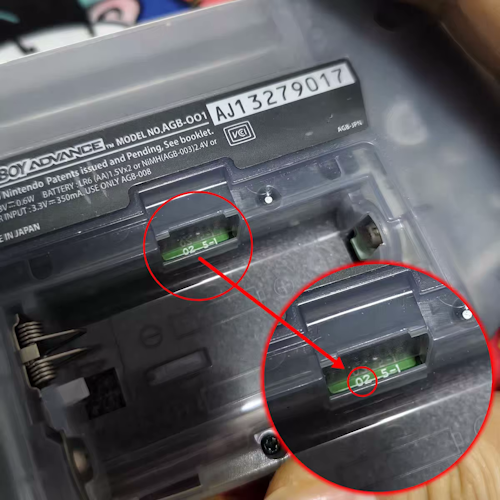
Some flashcarts may not work reliably on original Gameboy Advance consoles (AGB-001) with an “02” motherboard.
Click here for more information
Some flashcarts may not work reliably on original Gameboy Advance consoles (AGB-001) with an “02” motherboard. They may encounter glitches or instability issues due to that variant of the GBA not providing enough power for GBA flashcarts, which often require more power than a standard GBA cartridge, such as the EZ Flash Air and SuperChis Prime. You can check which variant you have by looking at the gap in the battery compartment and seeing if there is an “02” printed there. The reliability issues worsen if the console has a hardmod installed, such as an IPS display and/or a LiPo battery.
ChisCart offers an AGB-001 power upgrade module for affected AGB-001 models that fixes the instability issues with some flashcarts; however, please note that this requires soldering experience to install.
The module can be purchased from their Aliexpress store: https://www.aliexpress.com/item/1005012757368845.html. This power module is also suitable for other AGB-001 models that may be encountering stability issues with GBA flashcarts.
If you own a SuperCard SD and would like to improve your experience with this flashcart, consider installing SuperFW on it to gain SDHC support, improved game compatibility, faster game loading, and pseudo-RTC. More information about SuperFW and other kernel options are available here.
The below flashcarts are purchasable from AliExpress or reputable retro accessory stores like Hand Held Legend and Retro Game Repair Shop.
Flashcarts #
SuperChis Prime #
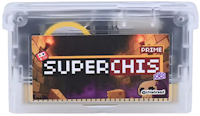
There are several fake versions of this flashcart on online marketplaces that are modified SuperCard SD carts being misbranded as SuperChis Prime or SuperChis Prime “2.0” carts. These do not function the same as a real SuperChis Prime and should be avoided.
The SuperChis Prime is a budget flashcart from ChisBread. It is based on the SuperCard SD, with the main difference being that it features a 1Gbit (128MB) NOR Flash for improved game compatibility.
Its firmware (SuperFW) uses a hybrid saving system. EEPROM or flash memory game saves are written directly to the SD card. However, games that save to SRAM will always save to SRAM. This means that a working SRAM battery is required for your save file to be retained after a reboot. The battery is soldered in but has a lifespan of approximately 10 years.
One downside of the cart is that games loaded from the SD card may encounter slowdown or compatibility issues; however, writing the game to NOR flash mitigates this problem. It also only has partial RTC support (or pseudo-RTC), where the RTC progresses only when a game is running, but it can be manually changed or advanced to any date desired.
Pros:
- Cheap and easily available
- Supports Cheats & Real Time Save
- Supports NDS mode via PassMe (Allows DS homebrew to be run from the SuperChis Prime when booted with a PassMe device or loader.)
Cons:
- No true RTC, Rumble or Slot-2 linking
- Uses SRAM saving for some games
- Games have slowdown if loaded from the SD card instead of the NOR flash
More information about the SuperChis Prime can be found on ChisBread’s GBATemp thread.
Purchase Links #
This cart costs around $20-30 USD. Purchase links have been provided below. They may not be the cheapest listings out there, but they are known to be selling genuine carts:
- AliExpress [1]: https://www.aliexpress.com/item/1005011542077406.html
- AliExpress [2]: https://www.aliexpress.com/item/3256812209378511.html
Detailed Information
The SuperChis Prime is a new (partial) source-available GBA flashcart that is the result of reverse engineering the SuperCard SD and vastly improving upon it. The main benefit that the SuperChis has over the SuperCard is the inclusion of a NOR flash chip. Games running off the NOR flash do not suffer from the same slowdown and compatibility issues that are present on the SuperCard SD. Loading times have also improved drastically, with it taking half the time to boot a game off the SD card when compared to the SuperCard.
There are a few drawbacks that the cart shares with the SuperCard SD. One of those is that it still relies on an SRAM battery for saves. It uses a soldered-in CR1616 battery, which should last a long time but may be difficult for some people to replace once it dies. The SuperChis Prime also lacks rumble and RTC support.
SuperFW helps to alleviate some of these issues, however. For the missing RTC, it uses a pseudo-RTC that advances the clock in supported games while they are running. If the SRAM battery is dead, there are still ways to save without losing any of your progress. Flash and EEPROM games can take advantage of direct saving, and SRAM-based games can have their save written manually from the in-game menu.
The SuperChis is also a great option for those that need a cart to use in conjunction with TWiLight Menu++ on DSL/NDS systems to load GBA games natively from Slot-1. It also supports DS mode via PassMe just like the SuperCard SD should you wish to use this cart for running DS games.
Everdrive GBA Pro #
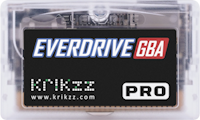
The Everdrive GBA Pro is a premium GBA flashcart from Krikzz that is the successor to the Everdrive GBA Mini. It is unique in that it has solar, tilt, and gyro sensors for games that require them. It uses PSRAM for saving, which means a working battery is required for save files to be retained after a reboot. The battery is, however, easy to replace, and the cart will display a message when it is running low.
One other advantage of the Everdrive GBA Pro is the high build quality and good technical support provided by Krikzz. This may be a factor for some users to choose this cart over the alternatives.
Pros:
- Supports isolated RTC, Cheats, Real Time Save and additional sensors for games that use them
- Supports the “Mode B” function needed for linking to DS games that support it
- Good build quality and better technical support
- Fastest SD card access speeds for fast ROM loading
Cons:
- Higher price than the alternatives
- No Rumble support
- No Memory Expansion support for DS consoles in Mode B
Purchase Links #
This cart costs $129 USD. You can find it on Krikzz website here: https://krikzz.com/our-products/cartridges/everdrive-gba-pro.html
Detailed Information
A more premium option from Krikzz. Compared to EZ Flash’s offering (the EZ Flash Omega DE B), it costs more money to buy, lacks a vibration motor and the ability to be used as a memory expansion pak on the DS. However, it does have solar, tilt, and gyro sensors, which are not found on most other flashcarts. It is a big upgrade over their older Everdrive GBA Mini.
Unlike the previous model, the Everdrive GBA Pro stores save data on PSRAM instead of SRAM. However, a battery is still required for save files to be retained after a reboot. The cart should warn you when the battery is running dry. It uses a CR1220 battery which is held in with a battery contact clip - therefore no soldering is required to replace the battery.
The game loading speed of the Everdrive GBA Pro has been increased over its predecessor. It adds extra features such as the aforementioned sensors, as well as cheats, save states, custom themes, and a “Mode B” function for DS game linking, similar to that of the EZFlash AIR and EZFlash Omega DE B.
Unlike those carts, Mode B is activated within the menu rather than a switch on the side of the cart. You select a ROM to start in Mode B, and on the next power-up, the flashcart will act like a regular game cartridge. To get out of Mode B, you have to start the cartridge without a microSD card inserted. After that, it’s back to being a regular flashcart again.
A comparison of the Everdrive GBA Mini and Everdrive GBA Pro from Krikzz is provided below:
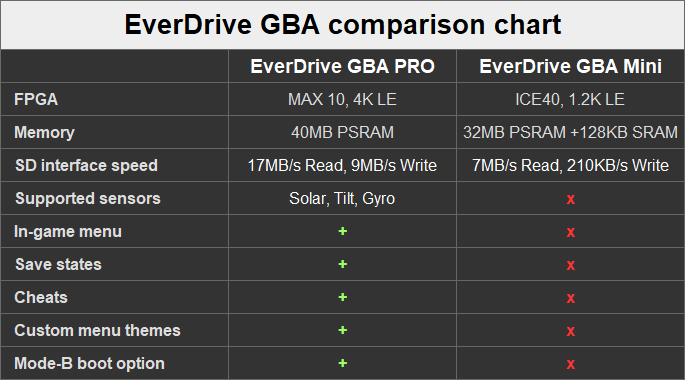
Image from Krikzz
EZ Flash Omega Definitive Edition B #
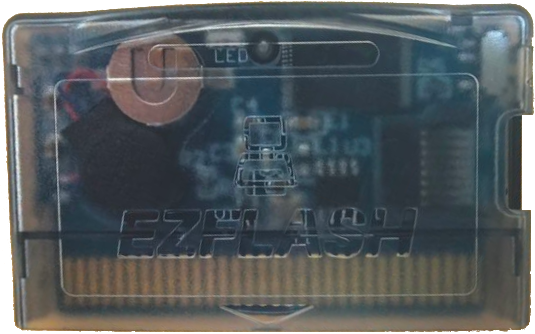
Some sellers may send out old stock of the, now discontinued, EZ Flash Omega DE. Despite the similar name, the “B” version comes with a bigger PSRAM and NOR flash, and is incompatible with the original Omega DE firmware. Not all sellers are clear which version they are selling.
The EZ Flash Omega Definitive Edition B is EZ Flash’s premium GBA flashcart. It features RTC, Rumble, DS Slot 2 linking, and supports flashing games to NOR or running directly from the SD card. It uses a more reliable saving system than its predecessor (EZ Flash Omega) by using FRAM and writing save data to the SD card on reboot. Unlike the original EZ Flash Omega, this does not offer a DS-Lite compatible flush-fitting shell.
Pros:
- One of the most fully featured GBA Flashcarts on the market
- More reliable saving system
- Supports the “Mode B” function needed for linking to DS games that support it
- Supports Rumble, RTC, Cheats, Real Time Save, Sleep mode and Memory Expansion for DS consoles in Mode B
Cons:
- More expensive and harder to find
- Lacks additional sensors for certain games
- No DS Lite compatible shell unlike it’s predecessor the EZ Flash Omega, so it does not fit flush with the bottom of the console
Purchase Links #
This cart costs around $90 USD. Purchase links have been provided here though they may not be the cheapest listings out there:
- AliExpress: https://www.aliexpress.com/item/1005010800505637.html
- Zedlabz: https://www.zedlabz.com/products/ez-flash-omega-definitive-edition-cartridge-for-game-boy-advance-sp-ez-flash
- Retro Game Repair Shop: https://retrogamerepairshop.com/products/ez-flash-omega-definitive-edition
- Senkogames: https://senkogames.com/products/ez-flash-omega-definitive-edition-gameboy
Detailed Information
The EZ Flash Omega Definitive Edition B is EZ Flash’s “new” premium option. It has some niche features like rumble and Slot-2 DS compatibility for linking. Fixes the save issue from the original Omega. Has a bigger PCB, so it doesn’t come with the alternative DS Lite shell that the EZ Flash Omega included. It replaces the very similarly named EZ Flash Omega Definitive Edition. This new B version features a bigger PSRAM and NOR Flash, as well as improved NOR management logic.
The EZ Flash Omega DE B has 512Mbit of PSRAM used to load games from the MicroSD card and 960Mbit of NOR Flash, where games can be written to and run from there instead. The NOR flash is also used for the “Mode B” function, which can present the EZ Flash as a stock GBA game cartridge on a Nintendo DS or DS Lite using the ROM flashed to NOR, for DS games that support linking to the GBA cartridge slot. The Mode B function can also be used to emulate a rumble pak or memory expansion pak on the DS.
The EZ Flash Omega DE B uses a CR1025 battery for its real-time clock (RTC). The battery itself is not save-critical, as the cart uses FRAM instead of SRAM for storing save data. The battery is held in with a battery contact clip; therefore no soldering is required to replace the battery. There isn’t any warning to say that the battery is running dry. The only sign that your battery needs replacing is that the RTC resets itself to the default time on each boot.
Important: The EZ Flash Omega DE B and the original Omega DE kernels are incompatible with each other. Do not try to flash an Omega DE kernel onto an Omega DE B and vice versa. Unlike the Omega DE, the kernel source code has not yet been released for the Omega DE B. It is unlikely that the cart will be supported by community-made kernels for the time being.
EZ Flash Air #
The EZ Flash Air is EZ Flash’s budget flashcart. It features RTC, Rumble, DS Slot-2 linking, and supports flashing games to NOR which is 960Mbit (120MB). Unlike the EZ Flash Omega DE B, due to the lack of PSRAM, games must be written to the NOR flash and played from there. There is no facility to run games directly from the MicroSD card.
Games are saved to the SRAM of the cart. This means the SRAM battery inside the EZ Flash Air is save-critical.
Pros:
- Supports the “Mode B” function needed for linking to DS games that support it
- Cheaper and more easily available, still has most required features
- Supports RTC, Cheats and Rumble
Cons:
- Uses SRAM for saving
- Games can only be loaded after being flashed to NOR
- No support for Real Time Save or Sleep mode
Purchase Links #
This cart costs about $40-50 USD. Purchase links have been provided here though they may not be the cheapest listings out there:
- Aliexpress: https://www.aliexpress.com/item/1005010800505637.html
- Zedlabz: https://www.zedlabz.com/products/ez-flash-air-cartridge-for-game-boy-advance-ez-flash
- Retro Game Repair Shop: https://retrogamerepairshop.com/products/ez-flash-air
- Senkogames: https://senkogames.com/products/ez-flash-air
Detailed Information
The EZ Flash Air is a budget flashcart which intends to replace the EZ Flash Omega. It is not a successor to the EZ Flash Omega DE, but they do share a similar design and shells can be interchanged between the two. The Air comes with a transparent shell, and there is the option to buy official red, green and blue shells too. It does not have the option of a DS Lite shell as the PCB is too big.
The Air uses SRAM for saves, which means the battery is save-critical. If the battery dies, the save file from the current game will be lost upon reboot. This is in contrast to the Omega, which was able to write save files directly to the SD card without needing a battery. Fortunately, the battery in the Air is easy to replace. It is a CR1220 battery held in with a clip, rather than being soldered in place like the Omega.
PSRAM was dropped from the EZ Flash Air in favour of a 960Mbit (120MB) NOR flash, up from the 512Mbit in the Omega/DE. Because of this, games must be written to the NOR flash before they can be played. The small size of the NOR flash will also limit the number of games you can store in it at one time. Write speeds to the NOR flash are quite slow, with it taking roughly 2 minutes to write 256Mbits (32MB).
RTC, cheats and soft-reset are all supported on the Air, but you lose out on save states and sleep mode which were present on the Omega. Some extra features the Air brings include GBA/DS Rumble support and DS-GBA link support, it does not have RAM expansion. There is a switch on the side to swap between Mode A and Mode B (DS Rumble pak or Link mode). When mode B is set to Link mode, the Air will load the first game written to the NOR flash as a standalone GBA game.
Information about the Air and it’s issues is still quite limited, most of what is written here came from EZ Flash’s FAQ document and GBASP’s review on the cart. Both are worth a read if you are considering the Air. A lot of cost was cut to make the Air cheaper than the Omega and the DE, but this came at the sake of convenience. One thing to note is that the issue with the lack of proper game management on the NOR flash was rectified in a later firmware update.
Everdrive GBA Mini #
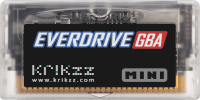
The Everdrive GBA Mini is Krikzz’s cheaper GBA Flashcart that is the predecessor of the Everdrive GBA Pro. It isn’t great value for money compared to other flashcarts, such as the EZ Flash Omega DE B, which have more features for a lower price. It uses SRAM for saving and therefore requires a working battery for save files to be retained after a reboot. The battery is, however, easy to replace and will display a message when it is running low.
One other advantage of the Everdrive GBA Mini is the high build quality and good technical support provided by Krikzz. This may be a factor for some users to choose this cart over the alternatives.
Pros:
- Full RTC support
- Good build quality and better technical support
- Fast SD card access speeds for fast ROM loading
Cons:
- Higher price than the alternatives
- No support for additional sensors or Mode B Slot 2 link
- No support for Cheats, Rumble, or Real Time Save
Purchase Links #
This cart costs $99 USD. You can find it on Krikzz website here: https://krikzz.com/our-products/cartridges/everdrive-gba-mini.html
Detailed Information
Premium option from Krikzz. It fits snug like a regular cartridge. However, the EZ Flash Omega DE B costs less and has more features in comparison. What it lacks in features, it gains in support and build quality. This may be a good option if you prefer better support over more functionality.
The Everdrive GBA Mini uses SRAM instead of FRAM for storing save data, which means that the battery inside of it is save-critical. The cart should warn you when the battery is running dry. It uses a CR1220 battery which is held in with a battery contact clip - therefore no soldering is required to replace the battery.
A comparison of the Everdrive GBA Mini and Everdrive GBA Pro from Krikzz is provided below:
Image from Krikzz
Flashable GBA Carts #
These are GBA flashcarts that contain internal storage that is written to directly instead of using a MicroSD card.
ChisFlash Series #
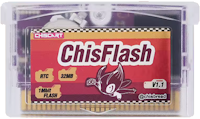
The ChisFlash series of carts are GBA Flashcarts that do not use a MicroSD. They instead contain an internal NOR chip to store a ROM and a seperate save chip for the game that is stored on it. These carts serve as an alternative to conventional MicroSD-based flashcarts by functioning more like a standard GBA cartridge that is rewritable. These carts are a good budget alternative for games supporting Slot 2 linking on the Nintendo DS, or for games that require RTC or Rumble features.
There are three variants of the ChisFlash Available.
- ChisFlash 1.1 - 32MB NOR with 128KB Flash-save & RTC.
- ChisFlash 1.2 - 32MB NOR with 128KB FRAM-save & Rumble.
- ChisFlash 1.0V - 32MB NOR with 512KB Virtual FRAM-save, cheaper alternative to the ChisFlash 1.2 that lacks Rumble.
Please note these are not version numbers, but rather different variants to fit different requirements or needs depending on the game being played.
For the ChisFlash 1.1, as it features RTC, it uses a coin cell battery to faciliate this. If the battery runs dry, it can be replaced as the battery is held in with a clip. However, if you have an older version, it may be soldered instead.
Writing ROMs to ChisFlash Carts #
ChisFlash carts must be written to using either a USB GBA reader device with software or a Nintendo DS/DS Lite with a way to run homebrew.
Compatible USB devices include:
- ChisFlash Burner
- GBxCart RW
- GeekSimon GBFlash
- BennVenn Joey Jr
- Game Bub
- Epilogue GB Operator
The ChisFlash Burner uses the beggar socket web flasher and requires a browser supporting WebUSB (such as Chrome or Edge).
The GBXCart RW, GBFlash, Joey Jr and Game Bub use FlashGBX.
The GB Operator uses the Playback Software.
For Nintendo DS/DS Lite users who are able to run homebrew, ChisFlash carts can be written using Burn2Slot which is available here. Save files can be backed up or written using GodMode9i and if you have a ChisFlash 1.1, the RTC can be adjusted with GBA_RTCRead.
Purchase Links #
These carts costs anywhere between $10-20 USD. Purchase links have been provided but they may not be the cheapest listings out there.
Please note these are not version numbers, please get the variant that best suits the type of games you wish to flash to them.
- ChisFlash 1.1 - Aliexpress: https://www.aliexpress.com/item/1005012287228960.html
- ChisFlash 1.2 - Aliexpress: https://www.aliexpress.com/item/1005012564808648.html
- ChisFlash 1.0V - Aliexpress: https://www.aliexpress.com/item/1005012547916875.html
Non-Recommended Flashcarts #
These are carts that you may encounter but are generally NOT recommended.
SuperCard SD #
The SuperCard SD has been supersceded by the SuperChis Prime and should be avoided unless you are unable to obtain a SuperChis Prime.
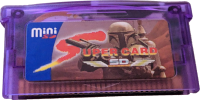
The SuperCard SD is a older flashcart that was previously the cheaper advised GBA flashcart, there are however now better alternatives available such as the SuperChis Prime.
The stock firmware requires GBA games to be converted using an tool and had poor game compatibility, however, thanks to the hard work of custom firmware developers like David G.F. and MetroidManiac with CFW such as SuperFW or SCFW, games are automatically patched on-device, and game saving is taken care of automatically.
Note that to install a custom firmware on the SuperCard SD, you will need to either use a 2GB SD card first to launch the installer from the stock firmware, or a Slot-1 flashcart and a DSL/NDS system on hand.
An archive of the stock firmware and ROM patcher for this cart can be found here: https://archive.org/details/supercard-slot-2-series
Alternative Custom Firmware #
As mentioned above, there have been efforts to improve this flashcart for normal use. There is a variety of custom firmwares that you can use on the SuperCard SD, each with their own features, pros, and cons. While they are all quite different to one another, they all support SDHC SD cards, which is a major improvement over the stock firmware.
SuperFW #
SuperFW has both a DS mode and a GBA mode. SuperFW can auto-save your games without having to reset to the main menu. It also automatically patches game ROMs while loading them, making SuperCard’s ROM patcher unnecessary. Unlike other CFWs mentioned below, it also has RTC patches for games that require a working RTC, and exFAT support. Do note, however, that it’s preferable to stick to FAT32, as it’s less likely to have issues in DS mode, and doesn’t corrupt as easily. SuperFW also has an in-game menu, which has options for updating the RTC clock in games, soft-resetting the game, resetting to firmware, manual saving, and save states management.
SCFW #
SCFW was the first of the three to be developed, and as of now, it only has a GBA mode. It automatically patches game ROMs, making SuperCard’s ROM patcher unnecessary. SCFW can also auto-save your games without having to reset to the menu. The modular kernel branch also features support for various GBA homebrew apps and emulators - you can find more details in this GBATemp thread.
SCSFW #
SCSFW mainly focuses on a DS mode for FlashMe/PassMe users. It does not have a GBA kernel, however, you can use it with SCFW or SuperFW if you need that functionality. It’s fairly limited in what it can do. It uses a custom build of nds-hb-menu which will let you run homebrew from the SD card. Since it is built into the firmware, you do not need any extra files on the SD card for it to work. SCSFW features automatic DLDI patching and boot hotkeys (press A+B on boot to configure them). The main use case for SCSFW is to autoboot into TWiLight Menu++ or AKMenu-Next.
Flashing firmware #
There are several ways to flash one of these firmwares to the SuperCard SD. Which one you use will depend on your setup and preferences:
- SCFW and SuperFW both have tools built in to flash SuperCard firmwares. All you need to do is follow the flashing instructions in their threads. If you are currently on the stock firmware of the cart, you will be limited to 2GB microSD cards during this process. However, once the new firmware has been flashed and is working properly, you can switch to an SDHC/SDXC card.
- If you have a DS flashcart that can run YSMenu, launching either SCFW or SuperFW from there with the SuperCard SD inserted should allow you to flash the firmware from there, bypassing the 2GB SD limit.
- SCKILL and superfw-nds-flasher-tool can be used from a DS flashcart to flash a new firmware as well as dumping your current one.
The SuperCard SDs being sold nowadays may use a flash chip with the id c2ba. These cannot be reflashed with the original updater/recovery tool from SuperCard. However, the flashing tools mentioned above all support writing to these carts without issue.
The SuperCard SD uses SRAM to store save data, so the battery is save-critical (depending on the firmware used). Most firmware options available for the SuperCard SD, including the stock firmware, have some sort of function to write your save file to the SD card without having to reboot your GBA. This means that, even if your battery is dead, you will still be able to keep your save data. The battery used in the SuperCard SD seems to vary in size depending on when you order one. They are held in with tabs soldered to the PCB, meaning that replacements are harder to find and install, especially if you haven’t soldered before. For replacement batteries, a CR1620 will fit just fine within the shell. A CR2025 is the biggest battery that can fit without any modification to the shell; however, it is a very tight fit and does cause the shell to warp slightly.
Disclaimer #
The information on this website is compiled from publicly available community sources & documentation. Flashcarts.net, its members, moderators, and contributors do not manufacture, sell, endorse, or guarantee any products referenced. No warranties, express or implied, are made regarding accuracy, completeness, compatibility, pricing, availability, or potential damage to hardware or software. Flashcarts.net is not affiliated with any manufacturer, retailer, or vendor. All information is provided for informational and educational purposes only and is used at your own risk.

This work is licensed under a Creative Commons Attribution-NonCommercial-ShareAlike 4.0 International License.